
Huntr Blog
What Is a Resume? Definition, Types, Key Sections, and What to Include in 2026
April 01, 2026

Last Updated: April 2026
Based on analysis of 225,000+ resumes and 1.7M+ job applications
What is a Resume?
A resume is a short document that sums up your work experience, education, skills, and achievements. You send it to employers when you apply for a job. Its purpose is simple: get you an interview.
The word "resume" comes from the French "resumer," meaning "to sum up." That's exactly what it does. It gives a hiring manager a quick look at who you are, what you've done, and why you're worth talking to.
Introduction
I'm Head of Career Strategy at Huntr, where we've analyzed over 225,000 resumes and 1.7 million job applications. I've also done 650+ one-on-one calls with job seekers at every level, from new grads to VPs. The data and those conversations tell the same story: a well-built, tailored resume is still the single most important document in your job search. Tailored resumes achieve roughly a 1.6x higher interview conversion rate than generic ones (about 6% vs 4%, or 1 in 17 applications vs 1 in 25).
This guide covers everything you need to know about resumes: what they are, the different types, which sections to include, what to leave off, and how to make yours stand out based on real data from hundreds of thousands of job seekers.
Why Do You Need a Resume?
Most employers require a resume as part of the application process. Even in a world of LinkedIn profiles and online portfolios, the resume remains the standard.
Here's why it matters:
It's your first impression. Recruiters spend an average of 6-7 seconds scanning a resume before deciding whether to read more. Those seconds determine whether you move forward or get filtered out.
It frames your story. A good resume doesn't just list jobs. It shows a pattern of growth, relevant skills, and results that match what the employer is looking for.
Our data from 500,000+ job seekers shows that the average job search takes about 90 days. I hear this on my calls all the time: people who start with a strong, tailored resume tend to land interviews faster. People who send the same generic PDF everywhere spend weeks wondering why nobody calls back.
Types of Resumes
There are three main resume formats. Each one works best in different situations.
Reverse-Chronological Resume
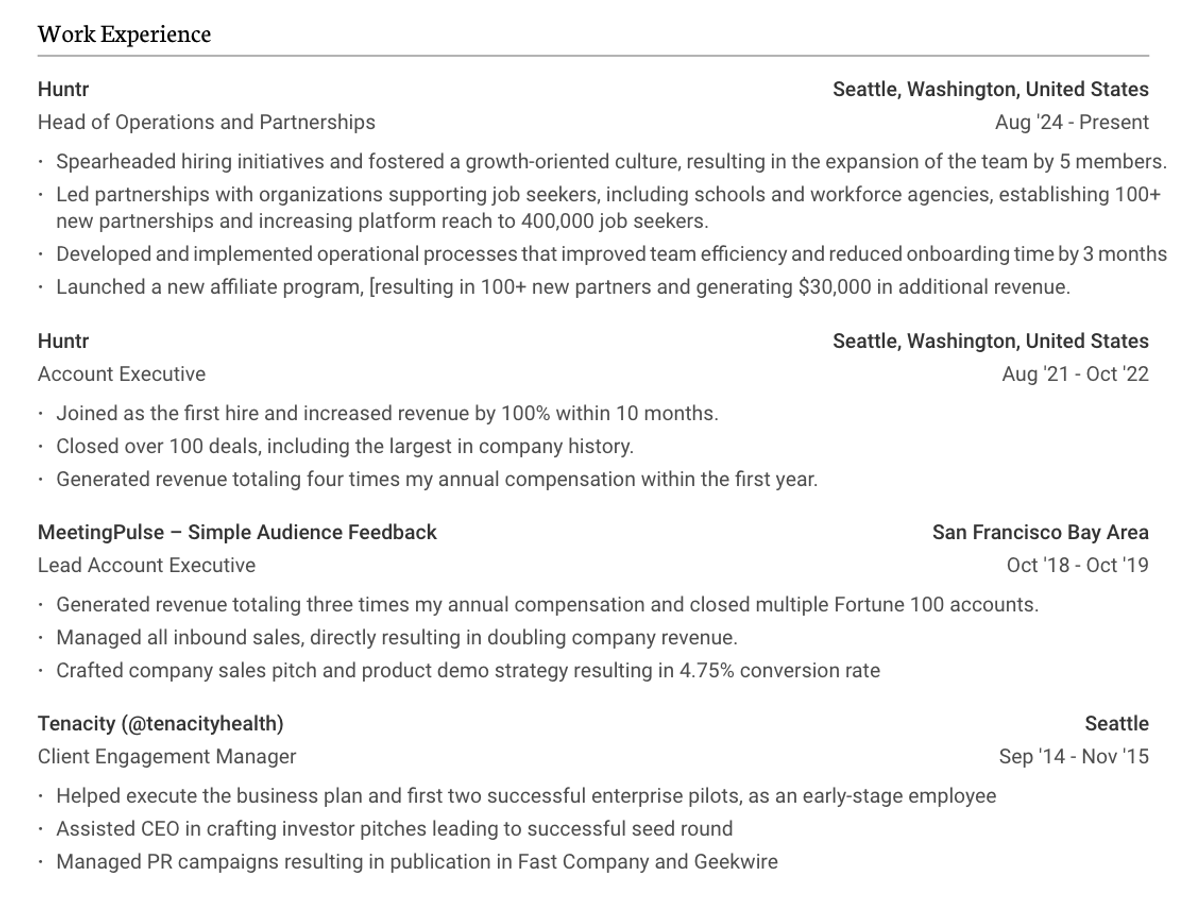
This is the most common format, and the one most recruiters prefer. It lists your work experience starting with your most recent job and working backward.
Best for: Most job seekers, especially those with a steady work history in one field.
Structure: Contact info, summary, work experience (reverse order), education, skills. For tips on resume design and margins, see our formatting guides.
Functional Resume
A functional resume leads with your skills instead of your job history. It groups your abilities into categories and downplays your career timeline.
Best for: Career changers, people with employment gaps, or those re-entering the workforce.
Structure: Contact info, summary, skills sections (grouped by category), brief work history, education.
A word of caution: Many recruiters view functional resumes with suspicion because they can hide gaps. I've heard this from hiring managers on multiple calls. Use this format only if a chronological layout would genuinely work against you.
Combination (Hybrid) Resume
This format gives equal weight to skills and work history. It leads with a strong skills section, then follows with a full chronological work history.
Best for: Experienced professionals who want to highlight specific skills while still showing career progression. Also works well for people moving into a related but different role.
Structure: Contact info, summary, skills section, work experience (reverse order), education.
[Image placeholder: Example of a combination resume from Huntr's templates]
Which Format Should You Choose?
For most people, the reverse-chronological format is the safest bet. In our analysis of 225,000+ resumes, chronological resumes made up the vast majority of those that led to interviews. Recruiters like them because they're easy to scan and they show a clear career path.
When someone asks me on a call which format to use, my answer is almost always the same: chronological, unless you have a specific reason not to.
What to Include on a Resume: Essential Sections
Every resume needs these core sections. The order may vary by format, but the content stays the same.
1. Contact Information
Put this at the top. Include:
Your full name, phone number, professional email address, city and state (no full street address needed), LinkedIn profile URL, and a portfolio or personal website if relevant.
Skip: your full mailing address, date of birth, and social media accounts that aren't professional.

2. Resume Summary or Objective
A resume summary is a 2-3 sentence pitch at the top of your resume. It should lead with your most impressive, measurable achievements.
Example of a strong summary: "Operations manager with 8 years of experience leading teams of 15-40. Reduced departmental costs by 22% over two years while improving on-time delivery from 87% to 96%. Seeking a Director of Operations role where I can apply my process improvement and team development skills."
A resume objective states what you're looking for. It works best for entry-level candidates or career changers who don't yet have a track record to summarize.
What I tell job seekers on calls: Lead your summary with the most impressive number you have. Total revenue, team size, percentage improvement, anything measurable. That's what makes a recruiter stop scrolling. And tailor it every time. Resumes with a summary that mirrors language from the job description convert at a higher rate in our data.

3. Work Experience
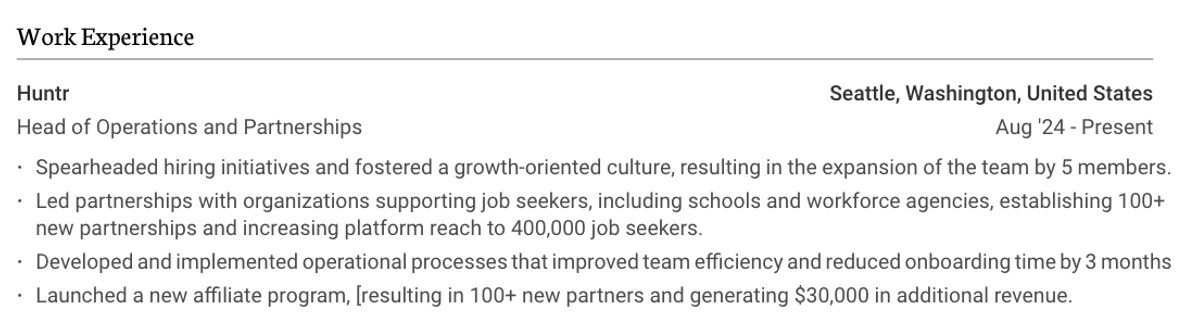
This section carries the most weight. For each role, include:
Job title, company name, location, dates of employment, and 3-5 bullet points describing what you did and the results you achieved. For more details on writing this section, see our guide on how to write your resume work history.
Lead each bullet with a strong action verb: managed, built, reduced, increased, launched, designed.
Quantify whenever possible. "Managed a team" is weak. "Managed a team of 12 that delivered $2.3M in revenue" is strong.
Focus on the last 10-15 years of work. Older roles can be listed briefly or left off entirely.
4. Education
Include your degree, the name of the institution, and your graduation year. If you graduated more than 5 years ago, you can drop your GPA.
Recent graduates can put education above work experience if their degree is their strongest qualification.
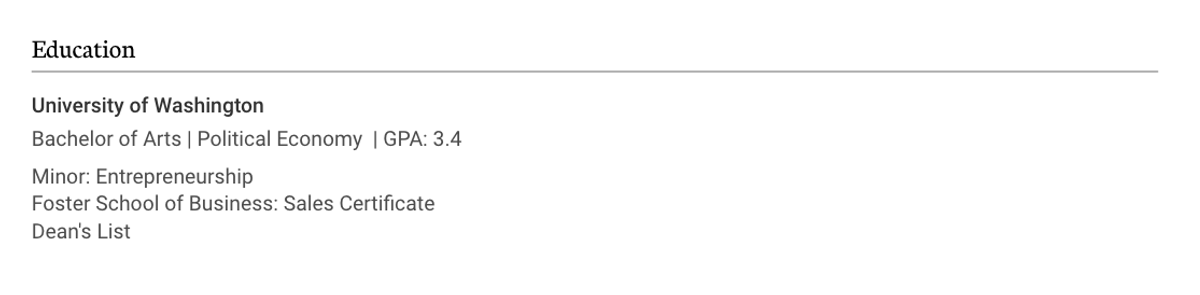
Include relevant coursework, honors, or extracurricular activities only if they relate directly to the job you're applying for.
5. Skills
List 10-20 skills that match the job description. Mix hard skills (software, tools, certifications) with soft skills (leadership, communication, problem-solving).
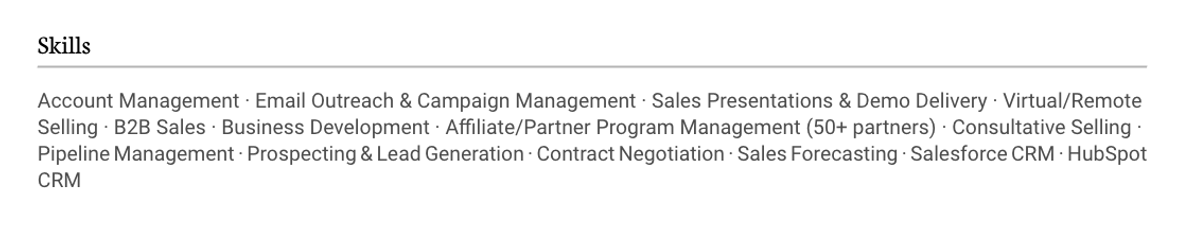
Tailoring matters here. Our data shows that resumes with a skills section tailored to the job description perform significantly better than those with a generic skills list. Read the job posting, find the key skills they ask for, and make sure yours are listed if you have them.
This is one of the simplest changes I recommend on calls, and one of the most effective. Pull up the job description, find the skills they list, and make sure yours match word-for-word where they're true.
Optional Resume Sections That Can Strengthen Your Application
Depending on your background and the role, adding one or more of these sections can set your resume apart.
Certifications and Licenses. List any professional certifications relevant to the role (PMP, CPA, AWS, Google Analytics, etc.). Include the issuing body and the date earned or renewed.
Languages. If you speak multiple languages and the role involves international work or a diverse customer base, list them with your proficiency level.
Volunteer Experience. This can fill gaps and show leadership. It's especially useful for early-career candidates or career changers.
Projects. Relevant personal or professional projects can show initiative and applied skills, particularly in tech, design, and creative fields.
Publications and Presentations. Useful for academic, research, or thought leadership roles.
Awards and Honors. Include these if they're relevant to the role or demonstrate exceptional performance.
What NOT to Include on a Resume
Knowing what to leave off is just as important as knowing what to include. These items hurt more than they help:
A photo or headshot. In the U.S., photos can introduce bias. Unless you're applying in a country where headshots are standard, leave it off.
Personal details like age, marital status, or religion. These aren't relevant to your ability to do the job. Including them can open the door to (even unintentional) discrimination.
An unprofessional email address. Create a simple, professional email ([email protected]) if you don't have one already. I've seen this more times than I can count on calls. It takes two minutes to fix and it matters.
"References available upon request." This line wastes space. Employers will ask for references when they need them.
Salary history or expectations. Save this for the interview stage unless the application specifically asks for it.
Irrelevant work experience. If it doesn't support your candidacy for this specific role, cut it. Every line on your resume should earn its place.
Dishonest information. Inflated titles, fake degrees, and exaggerated metrics will catch up with you. Background checks are standard.
An objective statement (if you have experience). If you have more than 1-2 years of work experience, use a summary instead. Objectives like "Seeking a challenging position that allows me to grow" tell the employer nothing useful.
Resume vs. CV: What's the Difference?
People often confuse resumes and CVs (curriculum vitae). They're different documents used for different purposes.
A resume is short (1-2 pages), tailored to a specific job, and focused on relevant skills and experience. It's the standard document for job applications in the U.S. private and public sectors.
A CV is longer (often 3+ pages), comprehensive, and covers your entire academic and professional history. It includes sections you'd never put on a resume: publications, research, conference presentations, grants, teaching experience, and professional affiliations.
When to use a CV: Academic positions, research roles, fellowships, grants, and applications in countries where "CV" is the standard term for any job application document (UK, New Zealand, parts of Europe, and Asia).
When to use a resume: Almost every other job application in the U.S. and Canada. For a related comparison, see our breakdown of cover letter vs. resume.
If a U.S. job posting asks for a "resume," send a resume. If it asks for a "CV," send a CV. When in doubt, check the industry norms. In tech, business, healthcare (non-academic), government, and most other fields, a resume is what they want.
How Long Should a Resume Be?
This is one of the most common questions I get on calls. We wrote a full breakdown of resume length, but here's the short version. The old advice was "always one page." Our data tells a different story.
After analyzing 225,000+ resumes, we found that two-page resumes perform as well as or better than one-page resumes across all experience levels. The one-page rule is outdated.
Here's a practical guide:
One page works well for entry-level candidates, recent graduates, and people with fewer than 5 years of experience, but two pages is fine if people in these groups have a lot to say that is relevant to the job they are applying to.
Two pages work well for mid-career and senior professionals with more experience to show. Don't stretch to fill two pages, but don't cut strong content just to fit one page either.
Three pages or more is almost never appropriate for a resume. If you need that much space, you're probably writing a CV.
The key isn't page count. Its relevance. Every line on your resume should serve a purpose. If cutting a section doesn't weaken your candidacy, cut it.
I tell people this on almost every call: if you have 10+ years of experience and you're squeezing everything onto one page, you're probably selling yourself short. Use two pages. The data backs it up.
How to Tailor Your Resume to a Job Description
Tailoring is the single highest-impact thing you can do to improve your resume's performance.
Our data from 1.7 million applications shows that tailored resumes convert to interviews at roughly 1.6x the rate of generic ones.
Here's how to tailor effectively:
Read the job description carefully. Highlight the key skills, qualifications, and responsibilities the employer lists.
Mirror the language. If the job posting says "project management," don't write "managed projects." Use their exact phrasing where it's truthful.
Reorder your bullets. Put the most relevant experience and achievements at the top of each section.
Adjust your skills section. Match it to the specific skills mentioned in the job posting.
Rewrite your summary. Your summary should read like a direct answer to "why should we interview this person for this specific role?"
I know tailoring takes time. That's why we built Huntr's AI resume builder to help you match your resume to a job description quickly, so you can apply to more jobs without sacrificing quality.
Where to Use Your Resume (and Which Job Sites Convert Best)
Your resume goes wherever employers ask for one: job boards, company career pages, networking contacts, recruiters, and career fairs.
Not all job sites are equal. Our data from 1.7M+ applications shows that these platforms have the highest application-to-interview conversion rates:
Google Jobs, Glassdoor, Wellfound (formerly AngelList), Indeed, and Welcome to the Jungle all outperform LinkedIn in conversion rate.
That doesn't mean you should ignore LinkedIn. It's still the largest professional network. But if LinkedIn is the only place you're applying, you're leaving interviews on the table. Spread your applications across 3-5 platforms for the best results. If you're looking for specialized roles, niche job boards can also outperform general platforms.
I recommend applying to 10-20 targeted jobs per week. "Targeted" is the keyword. Twenty tailored applications will outperform a hundred generic ones every time.
Frequently Asked Questions
What is a resume in simple terms?
A resume is a document that sums up your work experience, education, and skills. You send it to employers when you apply for a job. Its purpose is to show that you're qualified and to get you an interview.
What are the 5 main sections of a resume?
The five core sections are: contact information, resume summary or objective, work experience, education, and skills. You can add optional sections like certifications, volunteer work, or projects, depending on the role.
How long should a resume be?
One to two pages. After analyzing 225,000+ resumes, we found that two-page resumes perform as well as or better than one-page resumes across all experience levels. Focus on relevance, not page count.
Should I tailor my resume for every job?
Yes. Our data from 1.7 million applications shows that tailored resumes achieve a roughly 1.6x higher interview conversion rate than generic ones. Even small adjustments to your summary and skills section can make a difference.
What is the difference between a resume and a CV?
A resume is a 1-2 page document tailored to a specific job. A CV (curriculum vitae) is a longer, comprehensive record of your entire academic and professional history. In the U.S., use a resume for most jobs. Use a CV for academic, research, or fellowship applications.
What should I NOT put on a resume?
Leave off photos, personal details (age, marital status), salary information, irrelevant work experience, "references available upon request," and anything dishonest. These items either waste space, invite bias, or can disqualify you.
Start Building Your Resume
Whether you're writing your first resume or updating one you've had for years, the basics matter: clear structure, relevant content, tailored language, and honest presentation.
If you want to save time and get it right, Huntr's free AI resume builder helps you create a tailored resume that matches any job description. It's built on insights from 225,000+ resumes and 1.7 million applications. You can also browse 3,500+ resume examples by job title to see what works in your field.

Sam Wright
Sam Wright is the Head of Career Strategy at Huntr. Drawing on proprietary data from 1.7 million applications, 1 million job postings, 243,000 résumés, and a 1,049-respondent survey, Sam provides actionable, data-driven blueprints to help professionals navigate today's fractured hiring landscape. He has conducted over 900+ free support calls with job seekers, giving him frontline insight into today's job market. His work and insights have been featured in Business Insider, The Wall Street Journal, Forbes, and The Seattle Times.
Outside the tech world, Sam is a part-time farmer from a five-generation legacy of organic vegetable farming. He is a passionate advocate for farmland preservation.
Get More Interviews, Faster
Huntr streamlines your job search. Instantly craft tailored resumes and cover letters, fill out application forms with a single click, effortlessly keep your job hunt organized, and much more...
AI Resume Builder
Beautiful, perfectly job-tailored resumes designed to make you stand out, built 10x faster with the power of AI.
Next-Generation Job Tailored Resumes
Huntr provides the most advanced job <> resume matching system in the world. Helping you match not only keywords, but responsibilities and qualifications from a job, into your resume.
Job Keyword Extractor + Resume AI Integration
Huntr extracts keywords from job descriptions and helps you integrate them into your resume using the power of AI.
Application Autofill
Save hours of mindless form filling. Use our chrome extension to fill application forms with a single click.
Job Tracker
Move beyond basic, bare-bones job trackers. Elevate your search with Huntr's all-in-one, feature-rich management platform.
AI Cover Letters
Perfectly tailored cover letters, in seconds! Our cover letter generator blends your unique background with the job's specific requirements, resulting in unique, standout cover letters.
Resume Checker
Huntr checks your resume for spelling, length, impactful use of metrics, repetition and more, ensuring your resume gets noticed by employers.
Gorgeous Resume Templates
Stand out with one of 7 designer-grade templates. Whether you're a creative spirit or a corporate professional, our range of templates caters to every career aspiration.
Personal Job Search CRM
The ultimate companion for managing your professional job-search contacts and organizing your job search outreach.
Huntr
Blog Product Updates Resume Skill Guides Resume Examples Interview Question Guides Research 2025 Job Search Trends Report Affiliate Program Careers Privacy policy Terms of service Write for us LinkedIn Reddit r/HuntrCo Twitter @TryHuntr Email UsProduct
Job Tracker AI Resume Builder Resume Tailor Resume Checker AI Cover Letters Resume Summary Generator Resume Bullet Generator Resume Skills Generator Resume Headline Generator Resume Keyword Scanner Job Keyword Finder Targeted Resume Contact Tracker Interview Tracker Job Search Metrics Job Application Autofill Resume Storage AI Resume Review Job Clipper Resume Optimization ChatGPT Resume Builder Resume Fixer LinkedIn Resume Builder AI Resume Rewriter Interview Question Generator